
How to cut menu board errors and boost upsells with Digital Signage

Printed menu boards work well until something changes.
A supplier increases its prices. A popular item sells out. Breakfast service ends. A new promotion launches across several locations. Suddenly, every board must be replaced, covered, or manually correcte, and every delay creates a gap between what customers see and what the restaurant can actually sell.
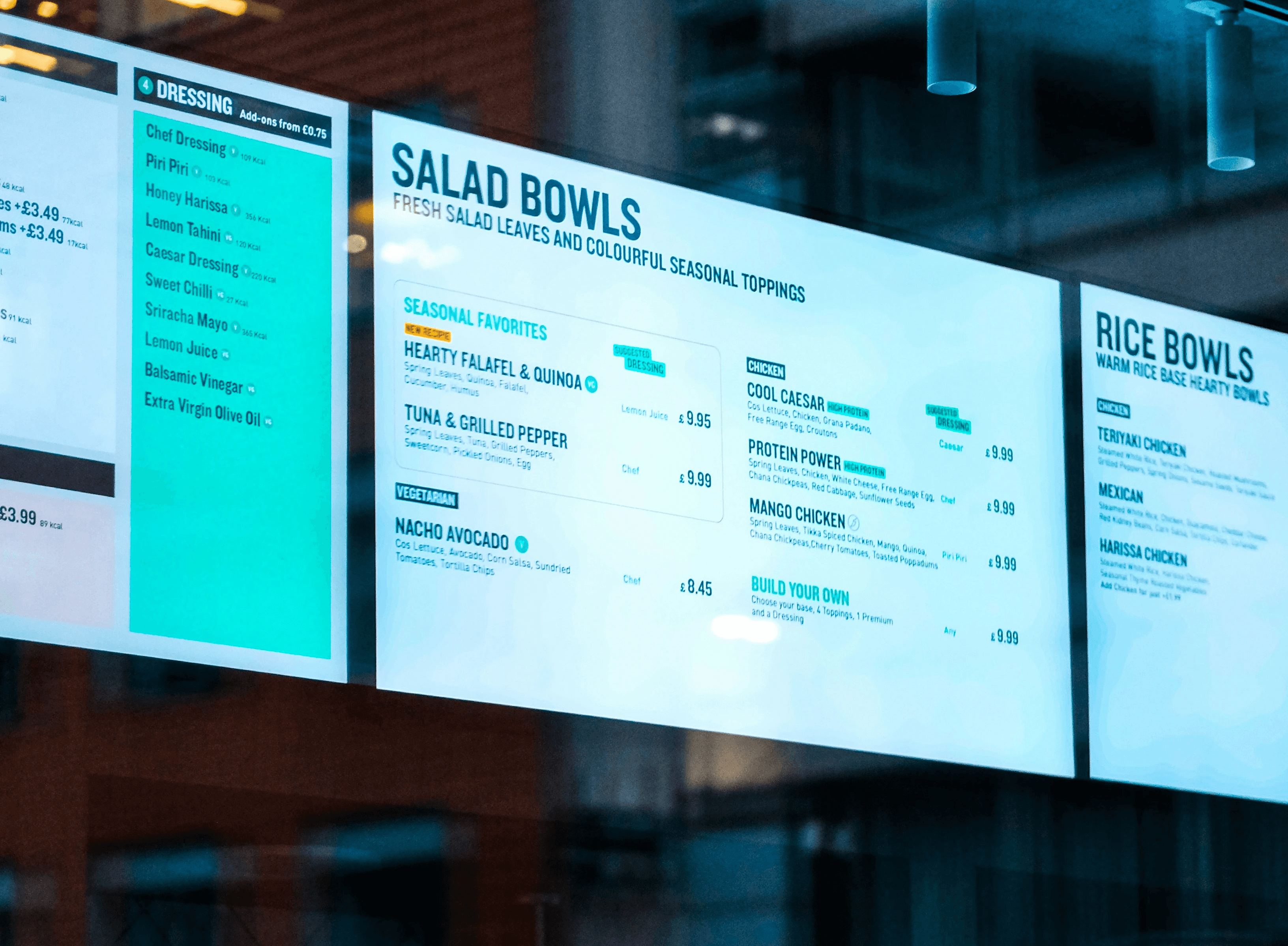
Digital menu boards solve this problem by turning the menu into centrally managed content. Prices, products, promotions, and availability can be updated remotely without printing and distributing new material.
For quick-service restaurants, this is not simply a visual upgrade. It is a practical way to reduce menu errors, improve consistency, and place more attention on profitable combinations and add-ons.
1. The hidden cost of static menu boards
The cost of a printed menu board extends far beyond the initial print run.
Every change can involve design work, internal approval, printing, shipping, installation, and removal of the previous version. For a restaurant with multiple locations, even a small price adjustment can become a surprisingly large project.
Static boards also introduce operational risks:
A promotion remains visible after it has ended.
A price is updated at one location but not another.
An unavailable product continues to be advertised.
Temporary paper signs create an inconsistent customer experience.
Employees must explain differences between the displayed menu and the point-of-sale system.
These problems affect more than appearance. If the displayed price differs from the price charged at the register, employees must spend time resolving the situation while customers wait. The restaurant may need to honor an outdated price, issue a refund, or remove the item from an order.
Digital menu boards allow an authorized manager to correct the content centrally and publish the update to every relevant screen. Instead of waiting for replacement material, the restaurant can respond within minutes. With Mirror there is also the possibility to fetch the correct prizes from another source that keeps them up to date and relevant.
For multi-location operators, this also creates better control. Headquarters can manage brand-wide content while still allowing individual locations to display approved local offers or availability messages.

2. Setting up daypart and inventory-based content rules
One of the main advantages of digital menu boards is the ability to show different content at different times.
A restaurant can create separate playlists or menu layouts for:
Breakfast
Lunch
Afternoon offers
Dinner
Late-night service
Weekends
Limited-time campaigns
The breakfast menu can automatically switch to the lunch menu at a scheduled time. This removes the need for employees to replace signs during a busy service period and prevents breakfast products from remaining visible after they are no longer available. With Mirror you can also set specific menu overrides for certain days of the year, making it simple and efficient showing a specific menu at an event or specific holidays.
A simple daypart schedule could look like this:
Time | Menu content | Promotional focus |
|---|---|---|
06:00–10:30 | Breakfast menu | Coffee, breakfast combinations |
10:30–14:00 | Lunch menu | Meals, drinks, quick add-ons |
14:00–17:00 | Afternoon menu | Snacks, desserts, cold drinks |
17:00–22:00 | Dinner menu | Larger combinations, sharing items |
Start with a small number of clearly defined schedules. Too many rules can make content management unnecessarily complicated. Four reliable dayparts are usually more useful than twelve overlapping schedules that are difficult to maintain.
Responding to product availability
Inventory-based content can be handled at several levels of sophistication.
The simplest approach is manual: a manager removes or hides an unavailable item from the current menu and publishes the change remotely.
A more advanced setup can connect the signage platform to a point-of-sale or inventory system. When stock reaches a defined threshold, the menu can automatically hide the item, mark it as unavailable, or replace it with another product. The exact options depend on the integrations supported by the restaurant’s technology stack.
Even without a direct inventory connection, digital signage provides a major improvement over print. A manager can update several screens without producing temporary signs or asking employees to explain that an advertised item has sold out.
3. Using digital boards to drive upsells and combos
Digital menu boards should do more than reproduce a printed menu on a screen. Their real commercial value comes from controlling what customers notice at the moment they make a decision.
A crowded board treats every product as equally important. An effective digital menu creates a clear visual hierarchy:
Lead with the main meal or current promotion.
Present a relevant combination.
Highlight one simple add-on.
Keep secondary choices visible without letting them dominate the screen.
For example, a burger restaurant could display a featured burger as the main visual, place the complete meal directly beside it, and use a short prompt such as:
Make it a meal, add fries and a drink
This is generally clearer than listing every available extra with the same visual weight.
Promote products with purpose
Decide which behavior each piece of content should encourage. Possible objectives include:
Converting individual products into meals
Increasing drink attachment
Promoting larger sizes
Increasing dessert sales
Moving seasonal products
Highlighting higher-margin items
Introducing a new product
Reducing pressure on overstocked ingredients
The strongest prompts are specific and easy to act on. “Add fries for 15 kr” is more useful than a general message such as “See our extras.”
Match promotions to context
Customer needs change throughout the day. Promotions should change with them.
During breakfast, coffee and breakfast combinations may be the most relevant upsells. At lunch, speed and complete meals may matter more. During the afternoon, desserts, snacks, and cold drinks can receive more screen space.
Digital signage also makes it possible to respond to conditions beyond the clock. A restaurant might promote cold drinks during hot weather, warm meals on cold days, or takeaway combinations before a local event. This would be possible when adding a weather service api to your Mirror workspace and building your menus with Rive.
Animation can help draw attention to these offers, but it should be used carefully. Constant motion across every screen makes the menu harder to read. Reserve movement for one focal area, such as the featured meal, new product, or add-on prompt.
Make every offer readable
Customers often have only a few seconds to understand the menu. Use:
Large, legible prices
Short product names
Strong contrast
High-quality product images
Consistent placement of prices
Limited text
Clear allergen or dietary indicators where required
Minimal animation around essential ordering information
The board should help the customer decide faster—not force them to wait for an animation before discovering the price.
4. Rollout tips for multi-location franchises
A multi-location rollout should begin with content operations, not hardware installation.
Before deploying screens, determine who owns each part of the process:
Who approves prices?
Who creates campaign content?
Who can publish updates?
Can local managers make changes?
Which content is mandatory across all locations?
How will unavailable products be handled?
Who receives an alert when a screen goes offline?
Create a standard menu system with reusable templates for products, prices, promotions, and dayparts. This allows future updates to be made without redesigning every screen.
Start with a pilot location
Test the system in one representative restaurant before expanding it across the entire group. The pilot should include real operating conditions: morning setup, peak lunch service, product changes, network interruptions, and employee handovers.
During the pilot, check:
Whether prices are easy to read from the ordering position
Whether content changes happen at the correct time
Whether the screen layout matches the actual customer journey
Whether employees know how to report incorrect content
Whether the player recovers automatically after losing power or connectivity
Whether urgent updates can be published quickly
Collect feedback from both customers and employees. Front-line staff will often notice practical problems that are invisible during a design review.
Separate central and local responsibilities
A useful model is to let headquarters control brand templates, national promotions, and standard pricing while giving locations limited access to approved local content.
For example, a local manager might be allowed to:
Hide an unavailable product
Activate an approved local offer
Add a temporary service message
Adjust content for local opening hours
They should not necessarily be able to change fonts, colors, core layouts, or national campaign material.
Plan for screen failure
Restaurants should also have a procedure for power loss, player failure, or a damaged screen. This might include a spare media player, a simplified emergency menu, remote device monitoring, and clear support ownership.

5. Measuring ROI: what to track in month one
A successful digital menu board rollout should be measured against a baseline. Record the restaurant’s performance before changing the boards, then compare the results under similar operating conditions.
The first month should focus on a small number of measurable indicators.
Average ticket size
Track whether customers spend more per transaction after the introduction of structured meal offers and add-on prompts.
Compare equivalent periods wherever possible. A holiday weekend should not be compared directly with an ordinary weekday.
Attach rate
Measure the percentage of relevant orders that include an add-on.
Examples include:
Orders containing fries
Orders containing a drink
Burgers upgraded to meals
Coffee orders containing a pastry
Main meals containing a dessert
If an add-on is promoted on screen, compare its attach rate before, during, and after the campaign.
Order accuracy and menu-related incidents
Record how often employees must explain an incorrect price, unavailable item, or expired promotion. Fewer incidents mean less friction at the counter and less time spent correcting customer expectations.
Update time
Measure how long it takes to change a price or promotion across all locations.
With printed boards, this process may include several stages and external suppliers. With digital signage, the same update may be completed centrally and published almost immediately.
Sales by daypart
Compare sales patterns with the content displayed during each period. This can reveal whether breakfast combinations, afternoon snacks, or dinner promotions are influencing customer choices.
Content uptime
Track whether every screen is online and displaying the correct content. A screen that is switched off, disconnected, or showing an outdated playlist cannot contribute to the campaign.
A simple ROI example
Consider a restaurant group that installs digital menu boards across five locations.
After the rollout, the operator records:
Fewer emergency reprints and replacement signs
Less employee time spent changing menus
Fewer disputes involving outdated prices
A higher attach rate for promoted meal combinations
A modest increase in average ticket size
The financial result can be estimated with a straightforward formula:
Monthly value = additional gross profit + avoided printing costs + saved labor costs − monthly signage costs
Use gross profit rather than total sales when evaluating promoted items. An increase in revenue does not produce the same value if the additional products have very low margins.
The example should also account for hardware, installation, software subscriptions, maintenance, and content production. This creates a more credible business case than focusing only on increased sales.
Start with accuracy, then optimize for sales
The first goal of a digital menu board project should be operational accuracy. Customers should see the correct products, prices, and promotions at every location.
Once that foundation is reliable, the restaurant can begin testing different layouts, dayparts, combinations, and add-on prompts. Small improvements can become meaningful when they are repeated across thousands of monthly orders and several locations.
Digital signage gives restaurant operators the flexibility to make those improvements without reprinting the menu every time something changes. It turns the menu board from a fixed expense into a measurable, adaptable sales channel.
Ready to modernize your restaurant menu boards?
Mirror Signage makes it easy to manage menu content remotely, schedule different menus throughout the day, and keep screens consistent across multiple restaurant locations.
Create your first digital menu, connect your screens, and start testing which products and promotions perform best.

Want to see more before you join?
Book a demo with us and get a tour of the Mirror or dive in straight away with our free trial.